Introduction
The internet, as we know it, relies on a fundamental service that often goes unnoticed: the Domain Name System (DNS). Often dubbed the “phonebook of the internet,” DNS is responsible for translating human-readable domain names, like www.google.com, into machine-readable Internet Protocol (IP) addresses, such as 142.251.46.238. Without DNS, navigating the web would require memorizing long strings of numbers for every website you wish to visit, a task both impractical and prone to error.
Understanding the internals of DNS is crucial for anyone involved in web development, network administration, or cybersecurity. It demystifies how web requests are routed, helps in troubleshooting connectivity issues, optimizes website performance, and provides a foundation for comprehending more advanced networking concepts like content delivery networks (CDNs) and security protocols (e.g., DNSSEC).
In this comprehensive guide, we will embark on a deep dive into the DNS lookup process. We’ll explore its hierarchical architecture, the roles of various DNS server types, the step-by-step journey a query takes from your browser to an authoritative name server, and the underlying mechanisms that make this distributed system efficient and resilient. By the end, you’ll have a profound understanding of how your simple act of typing a URL triggers a complex, yet remarkably fast, resolution process.
The Problem It Solves
Before the advent of DNS, connecting to a server on a network required knowing its numerical IP address. Early networks, like ARPANET, used a centralized HOSTS.TXT file that mapped hostnames to IP addresses. This file was manually maintained and distributed to every computer on the network. As the internet grew rapidly, this approach became untenable.
The core challenges that necessitated a system like DNS were:
- Memorability: Humans are better at remembering names (e.g.,
example.com) than complex numerical sequences (e.g.,192.0.2.1or2001:0db8::1). - Scalability: A centralized
HOSTS.TXTfile could not scale to the millions of hosts and billions of users on the burgeoning internet. Manual updates were slow, prone to errors, and created a single point of failure. - Flexibility: Changing a server’s IP address would require updating countless
HOSTS.TXTfiles, leading to service disruptions. A dynamic system was needed to abstract the underlying IP addresses from the user-facing domain names. - Decentralization: A single point of control for all internet names was undesirable for resilience and autonomy.
The Domain Name System was designed to solve these problems by providing a distributed, hierarchical, and resilient naming system that translates human-friendly domain names into machine-friendly IP addresses, enabling seamless communication across the global network.
High-Level Architecture
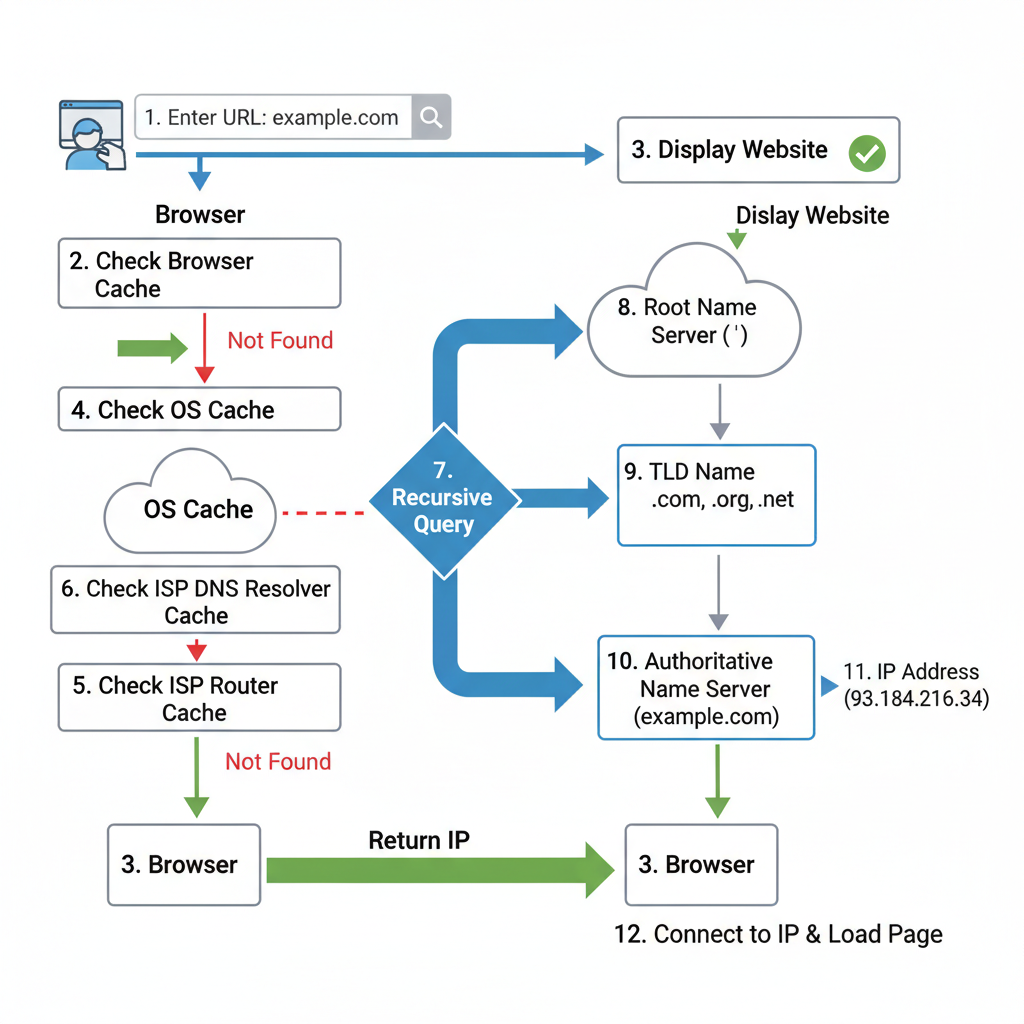
The DNS system operates on a hierarchical and distributed architecture, involving several types of servers that collaborate to resolve a domain name.
Component Overview:
- Browser: The application initiating the request (e.g., Chrome, Firefox). It sends the domain name to the operating system.
- Operating System OS: Manages network requests from applications. It first checks its own cache and the
hostsfile before forwarding the query to the configured DNS resolver. - DNS Resolver (Recursive Resolver): This is typically a server provided by your Internet Service Provider (ISP) or a public DNS service (like Google DNS 8.8.8.8). Its role is to take a DNS query and recursively follow the entire chain of DNS servers to find the IP address for the requested domain. It acts as an intermediary, caching results to speed up future lookups.
- Root Name Server: At the very top of the DNS hierarchy. There are 13 logical root servers globally, operated by various organizations. They don’t store domain IPs directly but know the IP addresses of the Top-Level Domain (TLD) name servers.
- TLD Name Server (Top-Level Domain): Manages information for specific TLDs like
.com,.org,.net,.io, or country codes like.uk,.de. It doesn’t store the final IP but knows which authoritative name server is responsible for a particular domain within its TLD (e.g., forgoogle.com, it knows the authoritative server forgoogle.com). - Authoritative Name Server: This is the final stop in the DNS lookup. It holds the actual DNS records (like A records for IPv4 addresses or AAAA records for IPv6 addresses) for a specific domain (e.g.,
google.com). It provides the definitive answer to the DNS query. - Web Server: The server hosting the website content, identified by the IP address returned by the DNS lookup.
Data Flow:
The flow starts with the user entering a domain name in the browser. This triggers a series of queries and responses, moving down the DNS hierarchy from the root, through TLDs, and finally to the authoritative server, before the IP address is returned to the browser, allowing it to connect to the web server.
How It Works: Step-by-Step Breakdown
The DNS lookup process is a series of queries and responses between various DNS servers, orchestrated by the recursive resolver.
Step 1: User Enters URL & Browser Initiates Lookup
When a user types a URL (e.g., www.example.com) into their browser and presses Enter, the browser first checks its own internal DNS cache to see if it already has the IP address for that domain. If not found, the browser delegates the request to the operating system (OS). The OS, in turn, checks its own DNS cache (often called the resolver cache) and then the hosts file (a local file that can map domain names to IP addresses). If the IP address is still not found, the OS forwards the query to the configured DNS resolver.
// Simplified browser/OS lookup initiation
function initiateDnsLookup(domainName) {
    console.log(`Browser: Initiating DNS lookup for ${domainName}`);

    // 1. Browser Cache Check
    if (browserCache.has(domainName)) {
        console.log("Browser: Found in browser cache.");
        return browserCache.get(domainName);
    }

    // 2. Delegate to OS
    console.log("Browser: Not in browser cache, delegating to OS.");
    const ipFromOS = osDnsQuery(domainName);
    if (ipFromOS) {
        return ipFromOS;
    }

    console.log("OS: Not in OS cache or hosts file, querying recursive resolver.");
    // In a real scenario, the OS would use configured DNS settings
    // For this example, we directly call the next step conceptually
    return recursiveResolverQuery(domainName);
}

// Dummy caches for illustration
const browserCache = new Map();
const osCache = new Map();
const hostsFile = new Map(); // e.g., {'localhost': '127.0.0.1'}

function osDnsQuery(domainName) {
    // OS Cache Check
    if (osCache.has(domainName)) {
        console.log("OS: Found in OS cache.");
        return osCache.get(domainName);
    }
    // Hosts File Check
    if (hostsFile.has(domainName)) {
        console.log("OS: Found in hosts file.");
        return hostsFile.get(domainName);
    }
    return null;
}
Step 2: OS Queries Recursive DNS Resolver
If the IP address is not found locally, the operating system sends a DNS query to the configured DNS resolver. This resolver is typically specified in your network settings and is often provided by your ISP. The query is usually a UDP packet sent to port 53. The recursive resolver’s job is to find the answer for the client, even if it means querying multiple servers.
# Simplified OS query to recursive resolver
def send_query_to_resolver(domain_name, resolver_ip="8.8.8.8"):
    print(f"OS: Sending query for '{domain_name}' to recursive resolver {resolver_ip}")
    # In reality, this would be a UDP request
    # For simulation, we assume the resolver will handle the rest
    return perform_recursive_lookup(domain_name) # Call the resolver's internal logic
Step 3: Resolver Queries Root Name Server
The recursive resolver, if it doesn’t have the answer cached, begins its journey by querying one of the 13 root name servers. It asks, “Where can I find the Top-Level Domain (TLD) server for .com (or whatever the TLD of the requested domain is)?” The root server doesn’t know the IP for www.example.com, but it knows which TLD servers are responsible for the .com domain. It responds with the IP addresses of the .com TLD name servers.
# Part of recursive resolver's internal logic
def perform_recursive_lookup(domain_name):
    print(f"Resolver: Starting lookup for {domain_name}")
    # Check resolver cache first
    if resolverCache.has(domain_name):
        print(f"Resolver: Found '{domain_name}' in resolver cache.")
        return resolverCache.get(domain_name)

    # Extract TLD (e.g., "com" from "www.example.com")
    tld = domain_name.split('.')[-1]
    print(f"Resolver: Querying Root Server for TLD '.{tld}'")

    # Simulate Root Server response
    # In reality, this would be a network query to a root server
    root_servers = {
        "com": "a.gtld-servers.net", # Example root server that knows about .com
        "org": "b.gtld-servers.net",
        # ... other TLD mappings
    }
    tld_server_domain = root_servers.get(tld)
    if not tld_server_domain:
        print(f"Resolver: Root server does not know about TLD '.{tld}'")
        return None
    print(f"Resolver: Root server responded with TLD server for '.{tld}': {tld_server_domain}")

    # For simplicity, we'll assume we get the IP directly for the TLD server
    # In reality, the resolver would then resolve tld_server_domain to an IP
    tld_server_ip = "192.0.2.2" # Example IP for a .com TLD server
    return query_tld_server(domain_name, tld_server_ip)
Step 4: Resolver Queries TLD Name Server
With the IP address of the .com (or relevant) TLD server, the recursive resolver then sends a query to that TLD server. It asks, “Which authoritative name server is responsible for example.com?” The TLD server responds with the IP addresses of the authoritative name servers for example.com.
# Part of recursive resolver's internal logic
def query_tld_server(domain_name, tld_server_ip):
    print(f"Resolver: Querying TLD Server {tld_server_ip} for authoritative server of '{domain_name}'")

    # Simulate TLD server response
    # In reality, this would be a network query
    tld_server_data = {
        "example.com": "ns1.example.com",
        "google.com": "ns1.google.com",
        # ... more domain to authoritative server mappings
    }
    authoritative_server_domain = tld_server_data.get(domain_name.split('.', 1)[-1]) # Get "example.com" from "www.example.com"
    if not authoritative_server_domain:
        print(f"Resolver: TLD server does not know about '{domain_name}'")
        return None
    print(f"Resolver: TLD server responded with authoritative server for '{domain_name}': {authoritative_server_domain}")

    # Again, assume we get the IP directly for the authoritative server
    authoritative_server_ip = "192.0.2.3" # Example IP for ns1.example.com
    return query_authoritative_server(domain_name, authoritative_server_ip)
Step 5: Resolver Queries Authoritative Name Server
Finally, the recursive resolver has the IP address of the authoritative name server for example.com. It sends a query to this server, asking for the actual IP address (A record or AAAA record) of www.example.com. The authoritative server contains the definitive DNS records for the domain and responds with the IP address, for instance, 93.184.216.34.
# Part of recursive resolver's internal logic
def query_authoritative_server(domain_name, authoritative_server_ip):
    print(f"Resolver: Querying Authoritative Server {authoritative_server_ip} for final IP of '{domain_name}'")

    # Simulate Authoritative server response
    # This is where the actual A/AAAA record is stored
    authoritative_records = {
        "www.example.com": "93.184.216.34",
        "example.com": "93.184.216.34",
        "www.google.com": "142.251.46.238",
        # ... actual DNS records
    }
    final_ip = authoritative_records.get(domain_name)
    if not final_ip:
        print(f"Resolver: Authoritative server does not have a record for '{domain_name}'")
        return None
    print(f"Resolver: Authoritative server responded with final IP: {final_ip}")

    # Cache the result for future lookups
    resolverCache.set(domain_name, final_ip)
    return final_ip
Step 6: Resolver Returns IP to OS/Browser
The recursive resolver now has the IP address. It returns this IP address to the operating system, which then passes it back to the browser. The resolver also typically caches this result for a duration specified by the Time-To-Live (TTL) value in the DNS record, speeding up subsequent requests for the same domain. The OS and browser may also cache the result.
# Continuation of the initial lookup function
def complete_lookup_process(domain_name):
    final_ip = initiateDnsLookup(domain_name) # This calls all preceding steps
    if final_ip:
        print(f"OS/Browser: Received IP address {final_ip} for {domain_name}")
        # OS and Browser can also cache the IP here
        osCache.set(domain_name, final_ip)
        browserCache.set(domain_name, final_ip)
        return final_ip
    else:
        print(f"DNS lookup failed for {domain_name}")
        return None

# Dummy caches for illustration
resolverCache = Map()
Step 7: Browser Connects to Web Server
With the IP address in hand, the browser can now establish a connection to the web server hosting www.example.com. It typically uses HTTP/HTTPS over TCP/IP to request the webpage content. Once the connection is established, the web server sends the requested resources (HTML, CSS, JavaScript, images, etc.) back to the browser, which then renders the webpage for the user.
// Browser connecting to web server
function connectToWebServer(ipAddress) {
    if (ipAddress) {
        console.log(`Browser: Establishing TCP connection to web server at ${ipAddress}`);
        // Simulate HTTP request
        console.log(`Browser: Sending HTTP GET request for / to ${ipAddress}`);
        console.log("Web Server: Responding with webpage content...");
        console.log("Browser: Displaying webpage.");
    } else {
        console.log("Browser: Cannot connect, no IP address found.");
    }
}

// Example of the full flow
// let finalIp = complete_lookup_process("www.example.com");
// connectToWebServer(finalIp);
Deep Dive: Internal Mechanisms
Mechanism 1: DNS Caching
DNS caching is a critical mechanism for improving the speed and efficiency of the DNS lookup process. Without caching, every single DNS query would have to traverse the entire hierarchical structure, leading to significant latency. Caching occurs at multiple levels:
- Browser Cache: Web browsers maintain their own DNS caches for a short period. If you visit a website frequently, the browser might have its IP address stored, bypassing the OS and external resolver queries.
- Operating System OS Cache: The OS (e.g., Windows DNS Client, macOS
mDNSResponder) maintains a local cache of recently resolved domain names. This is checked before querying an external DNS resolver. - Recursive Resolver Cache: This is the most significant cache. DNS resolvers (like your ISP’s resolver or Google DNS) cache responses from TLD and authoritative name servers. If a resolver has a cached entry for a domain, it can respond directly to the client without initiating a full lookup, drastically reducing latency.
- Router Cache: Some home or office routers also maintain a small DNS cache.
Each DNS record comes with a Time-To-Live (TTL) value, which dictates how long a record can be cached. Once the TTL expires, the cached record is considered stale, and a new lookup must be performed to ensure the information is up-to-date. A higher TTL means fewer lookups but slower propagation of changes; a lower TTL means faster propagation but more frequent lookups.
// Example of a simple cache with TTL
class DNScache {
    constructor() {
        this.cache = new Map();
    }

    set(domain, ip, ttlSeconds = 300) { // Default TTL of 5 minutes
        const expirationTime = Date.now() + (ttlSeconds * 1000);
        this.cache.set(domain, { ip, expirationTime });
        console.log(`Cache: Stored ${domain} -> ${ip} with TTL ${ttlSeconds}s`);
    }

    get(domain) {
        const entry = this.cache.get(domain);
        if (!entry) {
            return null;
        }
        if (Date.now() > entry.expirationTime) {
            console.log(`Cache: Entry for ${domain} expired.`);
            this.cache.delete(domain); // Remove expired entry
            return null;
        }
        console.log(`Cache: Hit for ${domain}.`);
        return entry.ip;
    }

    has(domain) {
        return this.get(domain) !== null;
    }
}

const browserCache = new DNScache();
const osCache = new DNScache();
const resolverCache = new DNScache();

// When a resolver gets an IP:
// resolverCache.set("www.example.com", "93.184.216.34", 3600); // Cache for 1 hour
Mechanism 2: DNS Hierarchy and Delegation
The DNS is a tree-like hierarchy, designed for scalability and decentralization.
- Root Zone: Represented by a single dot (
.), it’s the highest level. Root servers know where to find the TLD servers. - Top-Level Domains TLDs: These are domains like
.com,.org,.net,.gov,.edu, and country code TLDs (ccTLDs) like.uk,.de,.jp. Each TLD has its own set of name servers responsible for managing domains within that TLD. - Second-Level Domains: These are the familiar domain names registered by users, like
example.com,google.com. - Subdomains: Further divisions of a second-level domain, such as
www.example.com,blog.example.com.
The key principle is delegation. Instead of one server knowing all IP addresses, each level of the hierarchy delegates responsibility to the next lower level. The root servers delegate to TLD servers, and TLD servers delegate to authoritative name servers. This distributed responsibility ensures that no single server becomes a bottleneck and allows different organizations to manage their parts of the domain name space independently. This delegation is achieved through NS (Name Server) records, which tell resolvers which servers are authoritative for a given domain or subdomain.
Hands-On Example: Building a Mini Version
Let’s create a simplified Python script that simulates the core logic of a recursive DNS resolver. This “mini-resolver” will demonstrate how it queries different server types to find an IP address.
import time

# --- Mock DNS Server Data ---
# In a real scenario, these would be separate network services.
# For simplicity, we'll represent them as dictionaries.

# Root Server knows about TLDs
ROOT_SERVER_DATA = {
    "com": "tld-com-server-ip",
    "org": "tld-org-server-ip",
    "net": "tld-net-server-ip",
}

# TLD Servers know about Authoritative Servers for domains
TLD_SERVER_DATA = {
    "tld-com-server-ip": {
        "example.com": "auth-example-com-server-ip",
        "google.com": "auth-google-com-server-ip",
    },
    "tld-org-server-ip": {
        "wikipedia.org": "auth-wikipedia-org-server-ip",
    },
}

# Authoritative Servers hold the final IP addresses
AUTHORITATIVE_SERVER_DATA = {
    "auth-example-com-server-ip": {
        "www.example.com": "93.184.216.34",
        "example.com": "93.184.216.34",
    },
    "auth-google-com-server-ip": {
        "www.google.com": "142.251.46.238",
        "google.com": "142.251.46.238",
    },
    "auth-wikipedia-org-server-ip": {
        "www.wikipedia.org": "208.80.154.224",
        "wikipedia.org": "208.80.154.224",
    },
}

# --- Simplified DNS Resolver ---
class MiniDNSResolver:
    def __init__(self):
        self.cache = {} # {domain: {ip: "...", expiry: timestamp}}

    def _query_root_server(self, tld):
        """Simulates querying a Root Name Server for a TLD server's IP."""
        print(f"  Resolver: Querying Root Server for TLD '.{tld}'...")
        time.sleep(0.05) # Simulate network latency
        tld_server_ip = ROOT_SERVER_DATA.get(tld)
        if tld_server_ip:
            print(f"  Root Server: Responded with TLD server IP: {tld_server_ip}")
        else:
            print(f"  Root Server: Unknown TLD '.{tld}'")
        return tld_server_ip

    def _query_tld_server(self, domain, tld_server_ip):
        """Simulates querying a TLD Name Server for an Authoritative server's IP."""
        print(f"  Resolver: Querying TLD Server {tld_server_ip} for authoritative server of '{domain}'...")
        time.sleep(0.05) # Simulate network latency
        auth_servers_for_tld = TLD_SERVER_DATA.get(tld_server_ip, {})
        auth_server_ip = auth_servers_for_tld.get(domain) # TLD server knows about the full domain, not just subdomain
        if auth_server_ip:
            print(f"  TLD Server: Responded with Authoritative server IP: {auth_server_ip}")
        else:
            print(f"  TLD Server: No authoritative server for '{domain}'")
        return auth_server_ip

    def _query_authoritative_server(self, domain, authoritative_server_ip):
        """Simulates querying an Authoritative Name Server for the final IP address."""
        print(f"  Resolver: Querying Authoritative Server {authoritative_server_ip} for final IP of '{domain}'...")
        time.sleep(0.05) # Simulate network latency
        records_for_auth_server = AUTHORITATIVE_SERVER_DATA.get(authoritative_server_ip, {})
        final_ip = records_for_auth_server.get(domain)
        if final_ip:
            print(f"  Authoritative Server: Responded with final IP: {final_ip}")
        else:
            print(f"  Authoritative Server: No record for '{domain}'")
        return final_ip

    def resolve(self, domain_name, ttl_seconds=300):
        """Performs a full recursive DNS lookup."""
        print(f"\n--- Starting DNS lookup for: {domain_name} ---")

        # 1. Check Resolver Cache
        if domain_name in self.cache and self.cache[domain_name]['expiry'] > time.time():
            print(f"Resolver: Found '{domain_name}' in cache (TTL valid).")
            return self.cache[domain_name]['ip']

        print(f"Resolver: Cache miss for '{domain_name}'. Starting recursive query.")

        # Extract TLD (e.g., "com" from "www.example.com")
        parts = domain_name.split('.')
        if len(parts) < 2:
            print("Resolver: Invalid domain format.")
            return None
        tld = parts[-1]
        base_domain = ".".join(parts[-2:]) # e.g., "example.com" from "www.example.com"

        # 2. Query Root Server
        tld_server_ip = self._query_root_server(tld)
        if not tld_server_ip:
            return None

        # 3. Query TLD Server
        auth_server_ip = self._query_tld_server(base_domain, tld_server_ip)
        if not auth_server_ip:
            return None

        # 4. Query Authoritative Server
        final_ip = self._query_authoritative_server(domain_name, auth_server_ip)
        if final_ip:
            # Cache the result
            self.cache[domain_name] = {'ip': final_ip, 'expiry': time.time() + ttl_seconds}
            print(f"Resolver: Cached '{domain_name}' for {ttl_seconds} seconds.")
        else:
            print(f"Resolver: Failed to resolve '{domain_name}'.")

        return final_ip

# --- Usage Example ---
if __name__ == "__main__":
    resolver = MiniDNSResolver()

    # First lookup (cache miss)
    ip1 = resolver.resolve("www.example.com")
    print(f"Final resolved IP for www.example.com: {ip1}")

    # Second lookup for same domain (cache hit)
    ip2 = resolver.resolve("www.example.com")
    print(f"Final resolved IP for www.example.com (cached): {ip2}")

    # Lookup for a different domain
    ip3 = resolver.resolve("www.google.com")
    print(f"Final resolved IP for www.google.com: {ip3}")

    # Lookup for an unknown domain
    ip4 = resolver.resolve("nonexistent.invalid")
    print(f"Final resolved IP for nonexistent.invalid: {ip4}")

    # Wait for cache to expire and try again
    print("\n--- Waiting for cache to expire (simulated 1 second TTL) ---")
    resolver_short_ttl = MiniDNSResolver()
    ip5 = resolver_short_ttl.resolve("www.wikipedia.org", ttl_seconds=1)
    print(f"Final resolved IP for www.wikipedia.org: {ip5}")
    time.sleep(1.1)
    ip6 = resolver_short_ttl.resolve("www.wikipedia.org", ttl_seconds=1) # Should be a cache miss again
    print(f"Final resolved IP for www.wikipedia.org (after expiry): {ip6}")
Walkthrough:
MiniDNSResolverClass: Represents our simplified recursive resolver. It has acacheto store resolved IPs with an expiry timestamp.- Mock Servers (
ROOT_SERVER_DATA,TLD_SERVER_DATA,AUTHORITATIVE_SERVER_DATA): These dictionaries simulate the responses from different types of DNS servers. In a real system, these would be separate machines communicating over the network. _query_root_server,_query_tld_server,_query_authoritative_server: These methods simulate the network calls to the respective DNS server types. They introduce a smalltime.sleepto mimic network latency.resolve(domain_name, ttl_seconds): This is the main method that orchestrates the lookup.- It first checks its
cache. If a valid entry is found, it returns the IP immediately. - If not cached, it extracts the TLD from the
domain_name. - It then sequentially calls
_query_root_server,_query_tld_server, and_query_authoritative_serverto retrieve the necessary information step by step. - Once the
final_ipis obtained from the authoritative server, it stores this result in itscachealong with an expiry timestamp based on thettl_seconds.
- It first checks its
This script clearly illustrates the recursive nature of the DNS lookup, where the resolver progressively gets closer to the authoritative answer by querying different levels of the DNS hierarchy.
Real-World Project Example
To observe the DNS lookup process in a real-world scenario, you can use command-line tools like dig (Domain Information Groper) on Linux/macOS or nslookup on Windows. dig is generally more powerful and provides more detailed information.
Let’s use dig with the +trace option to see the full delegation path for a domain.
Setup Instructions (Linux/macOS):
- Open your terminal.
digis usually pre-installed. If not, on Debian/Ubuntu:sudo apt-get install dnsutils, on macOS:brew install dnsutils(if Homebrew is installed).
Full Code with Annotations:
# Command to trace the DNS lookup for example.com
dig example.com +trace

# Expected Output (annotations explaining each section):

; <<>> DiG 9.16.1-Ubuntu <<>> example.com +trace
;; global options: +cmd
.                        377770 IN NS h.root-servers.net. # Root server query
.                        377770 IN NS l.root-servers.net.
# ... (other root servers)
;; Received 228 bytes from 127.0.0.53#53(127.0.0.53) in 0 ms
# ^ This indicates the query was sent to your local recursive resolver (often 127.0.0.53 if systemd-resolved is running).
# It received a list of root servers.

com.                     172800 IN NS a.gtld-servers.net. # TLD server query
com.                     172800 IN NS b.gtld-servers.net.
# ... (other .com TLD servers)
;; Received 496 bytes from 192.33.4.12#53(c.root-servers.net) in 23 ms
# ^ The recursive resolver queried a root server (e.g., c.root-servers.net)
# and received the IP addresses of the .com TLD servers.

example.com.             172800 IN NS a.iana-servers.net. # Authoritative server query
example.com.             172800 IN NS b.iana-servers.net.
;; Received 168 bytes from 192.52.178.30#53(e.gtld-servers.net) in 21 ms
# ^ The recursive resolver queried a .com TLD server (e.g., e.gtld-servers.net)
# and received the IP addresses of the authoritative name servers for example.com.

example.com.             86400 IN A 93.184.216.34 # Final IP address
;; Received 56 bytes from 208.77.188.106#53(a.iana-servers.net) in 21 ms
# ^ The recursive resolver queried an authoritative server for example.com (e.g., a.iana-servers.net)
# and received the final A record (IPv4 address) for example.com.
# This IP address (93.184.216.34) is then returned to the client.
How to Run and Test:
- Simply execute
dig example.com +tracein your terminal. - You will see output similar to the above, showing each step of the resolution process from the root servers down to the authoritative name servers for
example.com. - The
;; Received X bytes from Y#53(Z) in N mslines indicate which server was queried (Z) and responded in that step, along with the round-trip time (N ms).
What to Observe:
- Delegation: Notice how each step provides information about the next server to query, rather than the final IP. The root server points to TLD servers, TLD servers point to authoritative servers.
- Server Types: You can identify the root servers (ending in
.root-servers.net), TLD servers (ending in.gtld-servers.netfor generic TLDs or specific ccTLD servers), and finally the authoritative servers for the domain itself. - Final Answer: The last section of the output shows the actual A (or AAAA) record with the IP address for
example.com. - Timings: The
in N mspart gives an idea of the latency for each hop in the DNS resolution chain.
This dig +trace command is an excellent way to visualize the distributed, hierarchical nature of DNS in action, confirming the step-by-step breakdown discussed earlier.
Performance & Optimization
DNS lookups, while fundamental, can introduce latency. Optimizing DNS performance is crucial for fast website loading and responsive applications.
- Caching: As discussed, multi-level caching (browser, OS, recursive resolver) is the primary optimization. By storing resolved IPs, subsequent requests for the same domain avoid the full lookup chain. TTL values are critical here; judiciously setting TTLs balances freshness with performance.
- Anycast for DNS Servers: Root, TLD, and many large recursive resolvers use Anycast routing. This means a single IP address is advertised from multiple physical locations globally. When a query is sent to an Anycast IP, network routers direct it to the nearest available server instance, significantly reducing latency for users worldwide.
- Content Delivery Networks CDNs: CDNs often use DNS to direct users to the closest server containing cached content. When you make a DNS query for a CDN-enabled domain, the authoritative DNS server for that domain might return different IP addresses based on your geographical location, guiding you to the nearest CDN edge node.
- DNS Prefetching: Browsers can proactively resolve domain names that appear in links on a webpage, even before the user clicks them. This is done using
<link rel="dns-prefetch" href="//example.com">tags, reducing the perceived latency if the user navigates to those links. - Fast and Reliable Recursive Resolvers: Using a fast, well-provisioned recursive resolver (e.g., Google Public DNS, Cloudflare DNS, OpenDNS) can often outperform default ISP resolvers, especially if the ISP’s servers are overloaded or geographically distant.
- Keepalive Connections: While not strictly DNS, once the DNS lookup provides the IP, the browser uses HTTP Keepalive (persistent connections) to reuse the TCP connection for multiple requests to the same server, avoiding repeated TCP handshake overhead.
Trade-offs:
- TTL vs. Freshness: A very low TTL ensures quick propagation of DNS changes (e.g., if you switch web hosts) but increases the load on DNS servers and the frequency of full lookups. A high TTL reduces load and speeds up cached lookups but delays change propagation.
- Centralization vs. Distribution: While DNS is distributed, the root servers are a critical, central point. Anycast helps distribute their load.
Common Misconceptions
- “My ISP’s DNS server knows all IP addresses.”
- Clarification: This is incorrect. Your ISP’s DNS server is a recursive resolver. It doesn’t store all IP addresses. Its job is to find the IP address by querying the hierarchical DNS system (root, TLD, authoritative servers) on your behalf. It then caches the result, so it might seem like it knows all IPs if you query it repeatedly for popular sites.
- “DNS is slow.”
- Clarification: While the full recursive lookup involves multiple network hops, it’s typically very fast, often completing within tens to hundreds of milliseconds. The perceived slowness of a website is usually due to factors like slow server response times, large page sizes, or network congestion, not the DNS lookup itself, especially with extensive caching.
- “The browser directly queries the root server.”
- Clarification: The browser initiates the request, but it delegates to the OS, which then queries the configured recursive DNS resolver. The recursive resolver is the entity that interacts directly with the root, TLD, and authoritative servers. The browser and OS only cache the final result.
- “DNS only translates names to IPs.”
- Clarification: While its primary function is A (IPv4) and AAAA (IPv6) record lookups, DNS also stores various other record types, such as:
- MX (Mail Exchanger): Specifies mail servers for a domain.
- NS (Name Server): Delegates a DNS zone to specific authoritative name servers.
- CNAME (Canonical Name): Creates an alias from one domain name to another.
- TXT (Text): Stores arbitrary text data, often used for SPF, DKIM, DMARC for email authentication, or domain verification.
- SRV (Service Record): Specifies a host and port for specific services (e.g., SIP, XMPP).
- Clarification: While its primary function is A (IPv4) and AAAA (IPv6) record lookups, DNS also stores various other record types, such as:
Advanced Topics
DNSSEC Domain Name System Security Extensions
DNSSEC adds a layer of security to DNS by using digital signatures to verify the authenticity and integrity of DNS data. It prevents DNS spoofing and cache poisoning attacks by ensuring that DNS responses originate from the correct zone’s authoritative name servers and have not been tampered with. This is achieved by cryptographically signing records in the DNS hierarchy.
DNS over HTTPS DoH and DNS over TLS DoT
Traditional DNS queries are sent over UDP (or TCP) in plain text, making them vulnerable to eavesdropping and manipulation. DoH and DoT encrypt DNS queries and responses.
- DoT: Encapsulates DNS queries within a TLS connection, typically over port 853.
- DoH: Encapsulates DNS queries within an HTTPS connection, typically over port 443, making it indistinguishable from regular web traffic. These protocols enhance user privacy and security by preventing ISPs or other intermediaries from seeing or tampering with DNS queries.
Anycast for DNS
As mentioned in performance, Anycast is a routing technique where multiple servers share the same IP address. When a client sends a request to an Anycast IP, network routers direct the request to the nearest available server advertising that IP. This is widely used for root and TLD servers, as well as major public resolvers, to provide high availability and low latency globally.
Comparison with Alternatives
While DNS is the ubiquitous standard, it’s helpful to understand its alternatives and predecessors to appreciate its design.
hostsfile: As discussed, this was the initial method for name resolution. It’s a local file (/etc/hostson Unix-like systems,C:\Windows\System32\drivers\etc\hostson Windows) that maps hostnames to IP addresses.- Pros: Simple, no network dependency for resolution.
- Cons: Not scalable, requires manual updates on every machine, no support for dynamic updates, no hierarchy.
- Why DNS is better: DNS is distributed, scalable, dynamic, and hierarchical, making it suitable for the global internet. The
hostsfile still exists for local overrides or blocking specific domains.
Hardcoded IP Addresses: Directly using IP addresses in applications or configurations.
- Pros: Bypasses DNS lookup entirely, potentially faster for very specific, static connections.
- Cons: Extremely inflexible. If the server’s IP changes, the application breaks. Not human-friendly.
- Why DNS is better: DNS abstracts the underlying network topology, allowing infrastructure changes (like moving a server to a new IP) without affecting users who rely on domain names.
Debugging & Inspection Tools
Understanding these tools is vital for troubleshooting connectivity issues or analyzing network traffic.
dig(Domain Information Groper): (Linux/macOS) The most versatile command-line tool for querying DNS name servers.dig example.com: Basic A record lookup.dig example.com MX: Lookup Mail Exchanger records.dig @8.8.8.8 example.com: Query a specific DNS server (e.g., Google DNS).dig example.com +trace: Shows the full delegation path from root to authoritative server.dig example.com +short: Gives a concise answer.
nslookup(Name Server Lookup): (Windows, Linux/macOS) A simpler, interactive tool for querying DNS.nslookup example.com: Basic lookup.nslookup -type=mx example.com: Lookup MX records.nslookup example.com 8.8.8.8: Query a specific DNS server.
- Browser Developer Tools: Most modern browsers include network tabs in their developer tools (F12). You can often see the DNS lookup time as part of the total request waterfall for each resource. This helps identify if DNS resolution is a bottleneck for specific assets.
- Wireshark/tcpdump: Network protocol analyzers that can capture and display raw DNS query and response packets, allowing for deep inspection of the communication between client and DNS servers. This is useful for identifying issues like incorrect DNS server configurations or cache poisoning attempts.
ping/traceroute(tracerton Windows): While not DNS-specific, these tools rely on DNS resolution. Ifpingfails with an “unknown host” error, it points to a DNS problem.traceroutecan show the path packets take, helping to diagnose network issues that might affect DNS communication.
Key Takeaways
- DNS is the Internet’s Phonebook: It translates human-readable domain names into machine-readable IP addresses.
- Hierarchical and Distributed: DNS is organized in a tree structure (root, TLD, authoritative) and is distributed across many servers globally for scalability and resilience.
- Recursive Resolution: Your local DNS resolver (often from your ISP) performs recursive queries, traversing the DNS hierarchy on your behalf to find the authoritative answer.
- Multi-Level Caching is Key: Caching at the browser, OS, and resolver levels significantly speeds up lookups and reduces load on DNS servers. TTL values control cache validity.
- Delegation of Authority: Each level of the DNS hierarchy delegates responsibility for sub-domains to the next lower level, preventing any single point of failure and enabling distributed management.
- More Than Just IPs: DNS stores various record types, including MX for email, CNAME for aliases, and TXT for verification and security.
- Security and Privacy: Advanced protocols like DNSSEC, DoH, and DoT enhance the security and privacy of DNS communications.
This knowledge is invaluable for diagnosing network issues, optimizing website performance, understanding web security, and building robust internet-connected applications.
References
- How does the Domain Name System (DNS) lookup work? - ByteByteGo
- How DNS Lookup Works: A Step-by-Step Guide - LinkedIn
- The process of DNS lookup - Stack Overflow
- What is DNS? | How Does DNS Work? - Gcore
- How the Domain Lookup Process Works: DNS Illustrations - Telahosting
Transparency Note
This article was created by an AI technical expert using information retrieved from the provided search context. The content aims to provide an in-depth and accurate explanation of the DNS lookup process based on the available data.