Introduction
In the age of ubiquitous online video, consumers expect seamless access to a vast library of films, TV shows, and live events. Behind the scenes, ensuring this content is delivered securely and according to the rights granted by its creators is a complex, multi-layered system known as Digital Rights Management (DRM). For web video streaming, DRM is the invisible guardian that protects premium content from unauthorized copying and distribution.
Understanding the internals of web DRM is crucial for anyone involved in content creation, distribution, platform development, or even just curious about the technologies underpinning modern entertainment. It demystifies why certain content might not play on specific devices or browsers, the security trade-offs involved, and the intricate dance between hardware, software, and cryptographic principles.
This guide will take you on a deep dive into how DRM for web video streaming fundamentally works. We’ll explore its core purpose, the threat model it addresses, the end-to-end playback flow, the critical roles of Content Decryption Modules (CDMs) and license servers, and the intricate trust chains that bind the system together. We’ll then focus specifically on Google’s Widevine DRM, dissecting its L1, L2, and L3 security levels, the distinction between hardware and software trust, the role of secure enclaves, and the economic realities driving its adoption and cost. By the end, you’ll have a robust mental model of this essential technology, making its complexities understandable and unforgettable.
The Problem It Solves
The fundamental problem DRM for web video streaming solves is content piracy and unauthorized revenue loss. In an increasingly digital world, content can be copied and distributed with near-perfect fidelity and at virtually no cost. For content owners – film studios, broadcasters, music labels, and independent creators – this poses an existential threat to their business models. Without a mechanism to control access and usage of their intellectual property, the incentive to create high-quality, expensive content diminishes significantly.
Before the widespread adoption of robust DRM systems, premium digital content was highly vulnerable. Movies and TV shows could be easily downloaded, copied, and shared across peer-to-peer networks, often appearing online even before their official release. This led to:
- Massive Revenue Loss: Content owners lost potential sales and subscription revenue.
- Reduced Investment: Without adequate protection, investment in high-budget productions became riskier.
- Brand Dilution: Unauthorized, often lower-quality copies, could harm a brand’s reputation.
- Legal Challenges: Constant battles against illegal distribution were costly and often ineffective.
The core problem statement, therefore, is: How can content owners securely distribute high-value digital media over open networks like the internet, ensuring that only authorized users can access it, only under specified conditions, and with sufficient protection against unauthorized copying and redistribution, thereby preserving their intellectual property and revenue streams? DRM provides the technological and legal framework to address this challenge.
High-Level Architecture
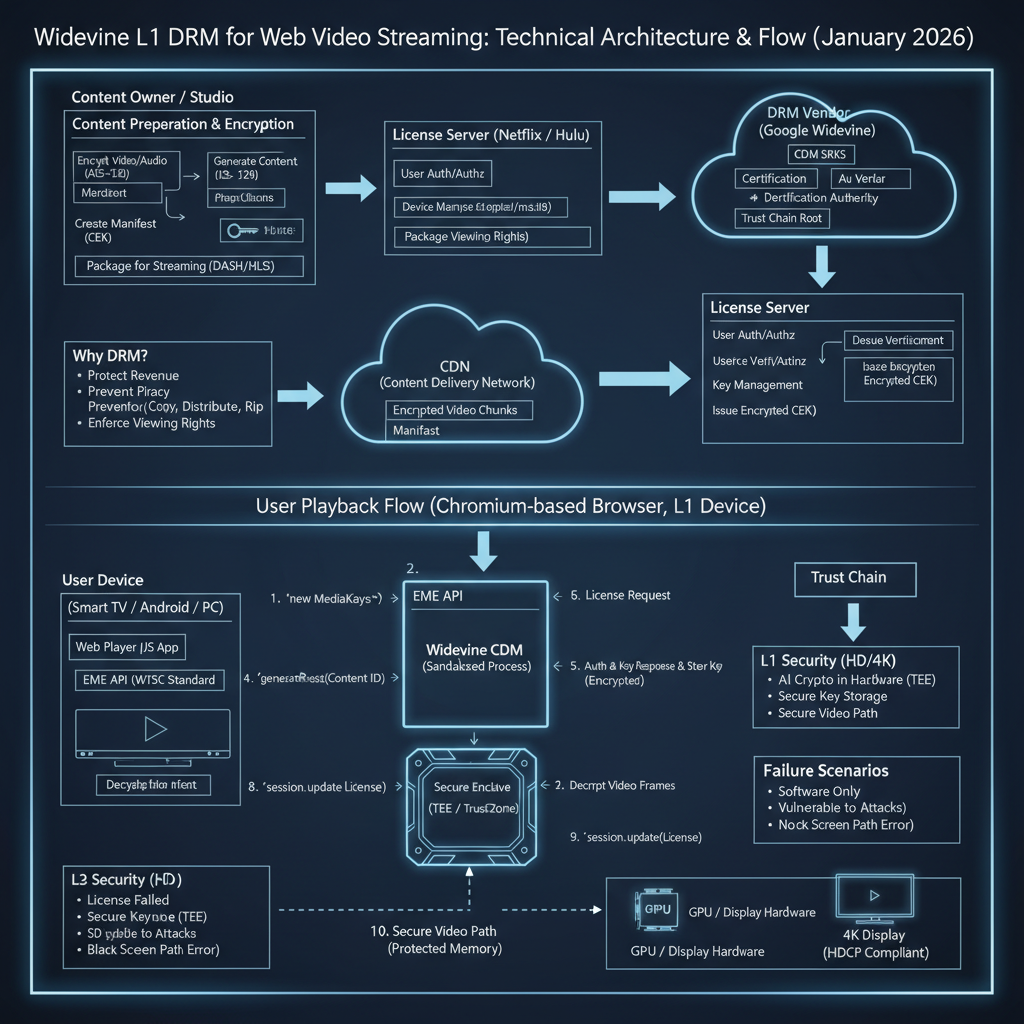
At its core, web video DRM involves a tightly integrated ecosystem of content providers, distribution networks, user devices, and specialized security components. The goal is to ensure that encrypted content remains unreadable until it reaches a trusted environment capable of decrypting and playing it according to predefined rules.
Component Overview:
- Content Provider: The owner or licensor of the media. They prepare the content for secure distribution.
- Encoded Encrypted Content: The actual video and audio data, compressed (e.g., H.264, HEVC) and then encrypted using a common encryption scheme (e.g., CENC - Common Encryption). This content is typically packaged into adaptive streaming formats like MPEG-DASH or HLS. Crucially, it includes metadata (like a PSSH box for Widevine) indicating the DRM system used and a content ID.
- Content Delivery Network (CDN): A distributed network of servers that stores and delivers the encrypted content efficiently to users globally.
- User Agent (Browser): The user’s web browser (e.g., Chrome, Firefox, Edge, Safari) which hosts the video player and interacts with the DRM system through standard web APIs.
- License Server: A server operated by the content provider or a DRM service provider. Its role is to authenticate the user and the requesting device, authorize playback based on subscription rules, and issue a “license” containing the decryption keys to the Content Decryption Module (CDM).
- Content Decryption Module (CDM): A proprietary, security-hardened software or hardware component responsible for decrypting the media content. It’s designed to be opaque to the browser’s JavaScript and to operate within a secure environment. Widevine is a prominent example of a CDM.
- Decrypted Media Frames: The raw, unencrypted video and audio frames produced by the CDM.
- Video Renderer & Display: The hardware and software components responsible for decoding the raw frames and displaying them on the screen. For higher security levels, this path must also be protected.
Data Flow:
- Content Preparation: The Content Provider encrypts their media and packages it for streaming. This involves encrypting the actual media data and embedding metadata that points to the required DRM system and license server.
- Content Delivery: The encrypted content is stored on and delivered by a CDN to the User Agent.
- Playback Initiation: The User Agent (browser) loads the streaming manifest (e.g., MPD for DASH). It detects that the content is encrypted and requires DRM by parsing the metadata.
- License Request: The User Agent, using the Encrypted Media Extensions (EME) API, interacts with the appropriate CDM. The CDM generates a unique “license request” (a challenge) based on the content ID and its own internal state, and the User Agent sends this request to the License Server.
- License Issuance: The License Server verifies the user’s subscription, authenticates the device (via the CDM’s challenge), and if authorized, generates an encrypted “license” containing the necessary decryption keys. This license is specific to the requesting CDM and content.
- Key Provisioning: The User Agent receives the encrypted license from the License Server and passes it to the CDM. The CDM decrypts the license internally and provisions the decryption keys.
- Decryption & Playback: As the encrypted media stream arrives, the CDM uses the provisioned keys to decrypt the media frames. These decrypted frames are then passed to the browser’s video engine for decoding and rendering to the display. For high-security content, this path to the display is also protected.
Key Concepts:
- Common Encryption (CENC): A standard that defines how media streams are encrypted, allowing multiple DRM systems to protect the same content.
- Encrypted Media Extensions (EME): A W3C specification that provides a JavaScript API for web applications to interact with CDMs. EME is not DRM itself, but an interface to DRM systems.
- Trust Chain: A cryptographic and operational framework that establishes confidence between all parties (content owner, DRM vendor, device manufacturer, browser, CDM, license server) that each component will behave as expected and enforce content rights.
How It Works: Step-by-Step Breakdown
Let’s trace the journey of a premium video from a content provider to your screen, detailing the DRM interactions at each stage.
Step 1: Content Preparation and Encryption
The journey begins with the content provider. Before any video can be streamed, it undergoes a rigorous preparation process.
- Encoding: The raw video and audio are compressed into various bitrates and resolutions (e.g., 480p, 720p, 1080p, 4K) using codecs like H.264, H.265 (HEVC), or AV1.
- Encryption: Each encoded segment (or “chunk”) of the video and audio is then encrypted using a symmetric encryption algorithm, typically AES-128 in CTR (Counter) mode, as defined by the Common Encryption (CENC) standard. CENC is crucial because it allows a single encrypted content stream to be protected by multiple DRM systems (e.g., Widevine, PlayReady, FairPlay) using different key delivery mechanisms.
- Key ID and PSSH Box: For each encrypted content piece, a unique Key ID (KID) is associated with the encryption key. This KID is embedded in the media alongside a Protection System Specific Header (PSSH) box. The PSSH box contains information specific to the DRM system (e.g., Widevine System ID) and the KIDs required for decryption. It acts as a hint to the browser and CDM about which DRM system to use and which keys to request.
- Packaging: The encrypted segments, along with their metadata (including PSSH boxes), are then packaged into an adaptive streaming format like MPEG-DASH (Dynamic Adaptive Streaming over HTTP) or HLS (HTTP Live Streaming). These formats generate a manifest file (e.g., an
.mpdfor DASH or.m3u8for HLS) that describes the available bitrates, segments, and their encryption details.
Step 2: Content Delivery and Player Initialization
Once prepared, the encrypted content and its manifest are uploaded to a Content Delivery Network (CDN).
- CDN Distribution: When a user requests to play a video, the CDN delivers the manifest file and subsequent media segments to the user’s web browser.
- Player Setup: The web page uses an HTML5
<video>element, often controlled by a JavaScript video player library (e.g., Video.js, Shaka Player, hls.js). The player loads the manifest file. - Encrypted Content Detection: The player parses the manifest and detects the presence of encrypted content by inspecting the PSSH boxes or other DRM-specific metadata. This signals to the browser that DRM intervention is required.
// Conceptual example: Player detecting encrypted content
const videoElement = document.getElementById('myVideo');
const player = new SomeVideoPlayer(videoElement); // A library like Shaka Player
player.load('path/to/manifest.mpd')
    .then(() => {
        console.log('Manifest loaded, checking for DRM...');
        // Internally, the player will examine the manifest for PSSH data
        // and trigger EME if encryption is detected.
    })
    .catch(error => {
        console.error('Error loading video:', error);
    });
Step 3: Encrypted Media Extensions (EME) Engagement
Upon detecting encrypted content, the browser’s Encrypted Media Extensions (EME) API comes into play. EME is a JavaScript API that allows web applications to interact with CDMs.
- Key System Access Request: The JavaScript player uses
navigator.requestMediaKeySystemAccess()to query the browser for available DRM systems (key systems) that can handle the content’s requirements (e.g., Widevine, PlayReady). It specifies thekeySystem(e.g.,com.widevine.alpha) andaudioCapabilitiesandvideoCapabilities(e.g., codecs, security levels). - CDM Selection: The browser, based on its internal configuration and the device’s capabilities, determines if it has a suitable CDM installed that can meet the requested security level. If multiple CDMs are available, it selects the most appropriate one.
- MediaKeys Object Creation: If a suitable CDM is found, the
requestMediaKeySystemAccess()promise resolves, and the player creates aMediaKeysobject, which represents the selected CDM instance.
// EME Step: Requesting access to a key system
const keySystem = 'com.widevine.alpha'; // Widevine's identifier
const config = [{
    initDataTypes: ['cenc'], // Common Encryption
    audioCapabilities: [{
        contentType: 'audio/mp4;codecs="mp4a.40.2"'
    }],
    videoCapabilities: [{
        contentType: 'video/mp4;codecs="avc1.42E01E"',
        robustness: 'SW_SECURE_CRYPTO' // Requesting L3 equivalent
    }]
}];

navigator.requestMediaKeySystemAccess(keySystem, config)
    .then(mediaKeySystemAccess => {
        console.log('MediaKeySystemAccess granted for Widevine.');
        return mediaKeySystemAccess.createMediaKeys();
    })
    .then(mediaKeys => {
        console.log('MediaKeys object created.');
        videoElement.setMediaKeys(mediaKeys); // Link MediaKeys to video element
        // Next, create MediaKeySession
    })
    .catch(error => {
        console.error('Failed to get MediaKeySystemAccess or create MediaKeys:', error);
        // Handle cases where DRM is not supported or requirements not met
    });
Step 4: MediaKeySession and Initial Data
Once MediaKeys are associated with the video element, the browser’s media engine starts processing the incoming encrypted media segments.
encryptedEvent: When the browser’s media source (e.g., Media Source Extensions - MSE) encounters encrypted data in the stream (specifically, the PSSH box or other initialization data), it fires anencryptedevent on the video element.- Initial Data: This event contains the
initData(the PSSH box) andinitDataType(e.g.,cenc). ThisinitDatacontains the Key ID (KID) needed to identify which decryption key is required. MediaKeySessionCreation: The JavaScript player creates aMediaKeySessionobject from theMediaKeysinstance. This session represents a specific content decryption context.
// EME Step: Handling the 'encrypted' event and creating a MediaKeySession
videoElement.addEventListener('encrypted', event => {
    console.log('Encrypted event received:', event.initDataType, event.initData);
    const mediaKeySession = mediaKeys.createSession(); // From the previous step
    mediaKeySession.addEventListener('message', event => {
        // This event contains the license request (challenge) from the CDM
        console.log('CDM Message (License Request) received:', event.messageType, event.message);
        // Send event.message (the challenge) to the License Server
        sendLicenseRequestToLicenseServer(event.message, mediaKeySession);
    });
    mediaKeySession.generateRequest(event.initDataType, event.initData)
        .catch(error => console.error('Error generating MediaKeySession request:', error));
});
Step 5: License Request Generation and Transmission
The MediaKeySession is now active and ready to communicate with the License Server.
- CDM Challenge Generation: When
mediaKeySession.generateRequest()is called with theinitData(PSSH box), the CDM internally processes this data. It extracts the Key IDs and other DRM-specific information. It then generates a unique, cryptographically signed “license request” (often called a “challenge”). This challenge typically contains:- The content’s Key IDs.
- Information about the CDM itself (e.g., its version, security level, device capabilities).
- A unique session ID.
- Cryptographic proof that the request originates from a genuine and trusted CDM instance.
- Browser Passes Challenge: The CDM passes this challenge back to the JavaScript layer via a
messageevent on theMediaKeySession. - Application Sends Request: The web application (player) then takes this challenge data and sends it as an HTTP POST request to the content provider’s License Server, typically along with user authentication tokens (e.g., session cookies, JWTs).
Step 6: License Server Processing and Key Provisioning
This is where the content provider’s business rules and cryptographic security converge.
- Authentication & Authorization: The License Server first authenticates the user (e.g., checks their login status, subscription) and authorizes the request. It verifies the cryptographic signature of the CDM’s challenge to ensure it’s a legitimate request from a trusted CDM.
- Key Retrieval: If authorized, the License Server retrieves the actual decryption keys associated with the requested Key IDs from its key management system.
- License Generation: The License Server constructs a “license” document. This license contains the decryption keys, encrypted specifically for the requesting CDM. It also includes playback policies (e.g., validity period, maximum resolution allowed, output restrictions, whether the license is persistent).
- License Delivery: The encrypted license is sent back to the browser as an HTTP response.
- Key Provisioning: The JavaScript player receives the license response and passes it to the
MediaKeySessionusingmediaKeySession.update(). The CDM internally decrypts the license, extracts the decryption keys, and securely stores them. These keys are now ready to decrypt the incoming media segments.
// Conceptual EME Step: Sending license request and updating session with response
async function sendLicenseRequestToLicenseServer(challenge, session) {
    try {
        const response = await fetch('https://licenseserver.example.com/widevine', {
            method: 'POST',
            headers: { 'Content-Type': 'application/octet-stream' },
            body: challenge // The CDM's challenge
        });
        if (!response.ok) throw new Error('License server request failed.');
        const license = await response.arrayBuffer(); // The encrypted license from server
        await session.update(license); // Provision keys to CDM
        console.log('Decryption keys provisioned successfully!');
        // Playback can now start or continue
    } catch (error) {
        console.error('Error fetching or updating license:', error);
        // Handle license acquisition failure
    }
}
Step 7: Decryption and Playback
With the decryption keys securely provisioned within the CDM, the playback can proceed.
- Media Buffering: The browser continues to download encrypted media segments.
- CDM Decryption: As encrypted segments are buffered, the browser’s media pipeline passes them to the CDM. The CDM uses the securely stored decryption keys to decrypt each segment. This decryption happens in a highly controlled environment within the CDM.
- Clear Frames to Decoder: The CDM outputs raw, unencrypted video and audio frames. These clear frames are then passed to the browser’s standard media decoders (which might be hardware accelerated).
- Decoding and Rendering: The decoders convert the raw frames into pixel data and audio samples. This data is then rendered to the screen and played through speakers. For high-security content (L1), the path from decryption to display is also protected.
Step 8: Secure Path (for L1 Security)
For the highest security levels (L1), the protection doesn’t stop at decryption.
- Hardware Trust: In an L1 system, the entire decryption, decoding, and often the rendering process occurs within a hardware-backed secure environment (a “TrustZone” or “Secure Enclave”). This means the decrypted video frames never leave the hardware’s trusted execution environment (TEE) in an unencrypted state.
- Protected Video Path: Even the path to the display is secured. This often involves hardware-level protection to prevent memory scraping, bus sniffing, or screen recording tools from capturing the unencrypted video frames. This is why L1 is typically required for HD, Full HD, and 4K content.
This multi-step process, orchestrated by EME and executed by the CDM and License Server, ensures that content remains protected throughout its journey from the content provider to the user’s display.
Deep Dive: Internal Mechanisms
Mechanism 1: Encrypted Media Extensions (EME)
EME is a crucial piece of the web DRM puzzle, but it’s important to reiterate: EME is not DRM itself. It is a JavaScript API that acts as a standardized interface between a web application and the underlying, proprietary Content Decryption Modules (CDMs) on a user’s device.
The EME API exposes a series of objects and events that allow web developers to:
- Query Key System Availability:
navigator.requestMediaKeySystemAccess(keySystem, configuration): This method is the entry point. It allows the web app to ask the browser if it supports a specifickeySystem(likecom.widevine.alpha) and if it can meet certainconfigurationrequirements (e.g., specific codecs, security robustness levels likeSW_SECURE_CRYPTOfor L3 orHW_SECURE_ALLfor L1). The browser will respond based on the installed CDMs and hardware capabilities. - Create MediaKeys: If access is granted,
MediaKeySystemAccess.createMediaKeys()returns aMediaKeysobject. This object represents a specific instance of the selected CDM. It’s tied to the video element viaHTMLMediaElement.setMediaKeys(). - Manage Decryption Sessions:
MediaKeys.createSession()creates aMediaKeySessionobject. Each session is a context for decrypting a specific piece of content, and it handles the communication with the License Server. - Generate License Requests: When the browser’s media pipeline encounters encrypted data (e.g., a PSSH box from the streaming manifest), it fires an
encryptedevent on the video element. The web app then callsMediaKeySession.generateRequest(initDataType, initData)to instruct the CDM to generate a license request (challenge) based on theinitData(PSSH). - Handle License Server Communication: The CDM emits a
messageevent on theMediaKeySessioncontaining the license request. The web app sends this request to the License Server. Upon receiving the License Server’s response, the web app passes it back to the CDM viaMediaKeySession.update(licenseResponse). This is where the CDM ingests the decryption keys. - Monitor Session State:
MediaKeySessionalso emits events for key status changes (e.g.,keystatuseschangeindicating if keys are available, expired, or errored).
Crucially, EME ensures that the web application never directly handles the decryption keys or the encrypted media data. It only acts as a conduit, passing opaque blobs (license requests, license responses) between the CDM and the License Server. This design principle is fundamental to maintaining the security integrity of the DRM system.
Mechanism 2: Content Decryption Modules (CDMs)
The CDM is the heart of the client-side DRM system. It is a proprietary, opaque component provided by the DRM vendor (e.g., Google for Widevine, Microsoft for PlayReady, Apple for FairPlay).
- Definition and Role: A CDM is responsible for:
- Parsing DRM-specific metadata (like PSSH boxes).
- Generating unique, cryptographically signed license requests.
- Securely receiving and storing decryption keys from the License Server.
- Decrypting encrypted media segments in real-time.
- Enforcing playback policies dictated by the license (e.g., no screen mirroring for L1 content).
- Maintaining a secure execution environment, especially for higher security levels.
- Integration into Browsers: CDMs are tightly integrated with web browsers, but their implementation varies:
- Native Integration (Chromium, Edge): For Widevine, the CDM is often shipped directly with the browser or downloaded as a component update. It runs within a heavily sandboxed process (e.g., a separate
widevinecdmprocess in Chrome) with restricted permissions, communicating with the browser’s media pipeline via inter-process communication (IPC). This tight integration allows for better security controls and performance. - Plugin/Extension (Firefox): Historically, Firefox used a plugin architecture (e.g., a shared library loaded by the browser process) for Widevine. While still sandboxed, this model might have different security characteristics than a fully out-of-process design.
- OS/Hardware Level (Safari/FairPlay): Apple’s FairPlay Streaming often leverages OS-level DRM services and hardware capabilities directly integrated into macOS/iOS, making the “CDM” less of a separate software module and more of an inherent system capability.
- Native Integration (Chromium, Edge): For Widevine, the CDM is often shipped directly with the browser or downloaded as a component update. It runs within a heavily sandboxed process (e.g., a separate
- Opaque to JavaScript: The CDM’s internal workings are completely hidden from the JavaScript application. This prevents malicious scripts from attempting to extract keys or manipulate the decryption process. The EME API provides only high-level control and opaque data exchange.
- Security hardening: CDMs are designed with significant security hardening, including anti-tampering measures, obfuscation, and integrity checks, to resist reverse engineering and attacks.
Mechanism 3: License Servers and Key Management
The License Server is the content owner’s gatekeeper, enforcing business rules and managing the distribution of decryption keys.
- Authentication and Authorization:
- User Authentication: Before issuing a license, the server verifies the user’s identity and subscription status. This typically involves checking session cookies or JWTs passed by the web application.
- Device/CDM Authorization: The License Server also validates the CDM’s license request (challenge). This challenge contains cryptographic proof (e.g., a signature using a key unique to the CDM instance) that it originates from a genuine and trusted CDM. This prevents spoofed requests.
- Key Derivation and Rotation:
- Content Keys: The actual decryption keys for the media segments are stored securely in a Key Management System (KMS) backend, separate from the License Server.
- Key Rotation: For long-form content or live streams, keys are often rotated periodically (e.g., every few minutes or for each segment) to limit the damage if a key is compromised.
- Key Encryption Key (KEK): The content keys are encrypted using a Key Encryption Key (KEK) that is specific to the CDM requesting the license. This ensures that only the intended CDM can decrypt the license payload.
- Playback Policies: The License Server embeds various playback policies into the license, such as:
- License Duration: How long the keys remain valid (e.g., 2 hours for a movie rental).
- Persistent Licenses: Whether the CDM can store the keys for offline playback.
- Output Protection: Requirements for HDCP (High-bandwidth Digital Content Protection) or other secure output mechanisms.
- Resolution Limits: Restricting playback to certain resolutions based on device security level.
- Trust Chain: A robust trust chain is established:
- Content Owner trusts DRM Vendor (e.g., Google): The content owner trusts that Google’s Widevine system is secure and will protect their content.
- DRM Vendor trusts Device Manufacturer: Google certifies device manufacturers (and browser vendors) to ensure their hardware and software implementations of the Widevine CDM are secure and meet specified robustness levels. This involves audits and strict guidelines.
- Device Manufacturer builds Secure Hardware: The device manufacturer implements secure enclaves, TrustZones, and anti-tampering measures.
- License Server trusts CDM Instance: Through cryptographic attestation in the license request, the License Server can verify that the request comes from a genuine, uncompromised CDM instance running on a certified device.
- CDM trusts License Server: The CDM is pre-configured with the public keys of trusted License Servers to verify the authenticity of the license response.
This intricate web of trust, enforced through cryptography and strict operational procedures, is what gives content owners the confidence to distribute their high-value assets.
Deep Dive: Widevine Architecture
Widevine is one of the most widely adopted DRM systems for web video, especially across Android, Chrome, and various smart TVs and set-top boxes. It’s owned by Google and plays a central role in protecting premium streaming content.
The core of Widevine’s security lies in its concept of security levels, which dictate the robustness of the environment where decryption and content processing occur.
Security Levels: L1, L2, L3
Widevine defines three primary security levels, each offering a different degree of protection:
Widevine L3 (Software-only Trust):
- Mechanism: Decryption and decoding are performed entirely in software, within the browser’s or operating system’s normal execution environment. There is no reliance on specialized hardware security features beyond basic CPU capabilities.
- Threat Model Addressed: Primarily protects against casual copying by making it difficult to directly access the raw encrypted files and requiring a license. It provides obfuscation and discourages simple file sharing.
- Limitations: Highly vulnerable to software attacks. Decryption keys and decrypted video frames are exposed in the device’s main memory, making them susceptible to memory scraping, debugging tools, or malicious software. The path to the display is also unprotected.
- Use Cases: Typically used for standard definition (SD) content or content where the content owner accepts a lower level of security, perhaps due to lower perceived value or broader device compatibility needs. Many desktop browsers without L1/L2 hardware support fall into this category.
Widevine L2 (Hardware-backed Cryptography, Software Decryption):
- Mechanism: Decryption is still performed in software, but critical cryptographic operations, such as key storage, key derivation, or signing of license requests, are offloaded to a hardware-backed secure environment (e.g., a Trusted Platform Module - TPM, or a small secure element).
- Threat Model Addressed: Improves upon L3 by making it significantly harder to extract the master decryption keys, even if the main software environment is compromised. The keys are never exposed in plaintext in the main memory.
- Limitations: The actual decryption of the media segments still happens in software, leaving the decrypted video frames vulnerable to memory scraping after decryption but before decoding. The path to the display is generally not fully hardware-protected.
- Use Cases: Less common in practice than L1 or L3. It represents a middle ground where some hardware security is available, but a full secure video path is not feasible or implemented.
Widevine L1 (Hardware-backed Decryption and Secure Video Path):
- Mechanism: This is the highest security level. The entire media pipeline – including decryption, video decoding, and compositing – occurs within a hardware-backed Trusted Execution Environment (TEE), often referred to as a Secure Enclave or TrustZone. This TEE is an isolated area of the main processor that runs its own secure operating system and applications, completely separated from the device’s main OS.
- Threat Model Addressed: Protects against sophisticated attacks, including memory scraping, bus sniffing, debugging, and screen recording. The decrypted video frames never leave the secure hardware environment in an unencrypted state. The output to the display is also protected, often requiring HDCP (High-bandwidth Digital Content Protection) to prevent unauthorized capture of the HDMI signal.
- Requirements: Requires specialized hardware support in the SoC (System on Chip) and a certified firmware implementation. This is significantly more complex and costly to implement.
- Use Cases: Required for HD (720p), Full HD (1080p), and 4K/UHD content by major content providers (Netflix, Disney+, Amazon Prime Video, Max, etc.). Without L1, these platforms will typically downgrade content to SD or refuse playback altogether for premium titles.
Hardware vs. Software Trust
The distinction between these levels fundamentally boils down to where trust is placed and enforced:
- Software Trust (L3): Trust is placed in the operating system, the browser sandbox, and the integrity of the CDM’s software code. This trust is relatively fragile as software can be compromised, debugged, or modified.
- Hardware Trust (L1, L2): Trust is rooted in immutable hardware. The secure enclave provides a physical and cryptographic barrier that isolates sensitive operations (key storage, decryption) from the rest of the system. Even if the main OS is compromised, the TEE remains secure, protecting the most critical assets.
Secure Enclaves / TrustZones
A Secure Enclave (Apple’s terminology) or TrustZone (ARM’s terminology, widely used in Android SoCs) is a hardware-isolated environment on a system-on-chip (SoC). It creates two distinct execution environments:
- Normal World: Runs the device’s main operating system (Android, Linux, Windows) and all user applications.
- Secure World (Trusted Execution Environment - TEE): Runs a minimal, highly secure operating system and trusted applications (like the Widevine L1 CDM).
Communication between the Normal World and Secure World is strictly controlled and mediated by hardware. This isolation ensures that:
- Code and data in the Secure World are protected from the Normal World.
- Cryptographic operations can occur in isolation.
- Keys are stored in hardware-backed storage within the TEE.
- The decrypted media path stays within the Secure World until it’s displayed, preventing external access.
Why L1 is Required for HD/4K Playback
Content owners demand L1 security for high-resolution (HD, 4K) and high-value content primarily because:
- Increased Value of Content: HD and 4K content represents a higher investment in production and a premium viewing experience. Content owners want to ensure this premium content is protected commensurate with its value.
- Threat of High-Quality Piracy: If HD/4K content could be easily captured (e.g., via memory scraping) from an L3 environment, it would enable the distribution of high-quality pirated copies, severely undermining content owner revenue. L1 mitigates this by keeping the decrypted frames within a secure, inaccessible hardware domain.
- Studio Mandates: Major Hollywood studios and other content licensors often mandate L1 compliance as a prerequisite for licensing their HD/4K titles to streaming services. This is a contractual obligation for streaming platforms.
- Protected Video Path: L1 ensures that the entire chain, from decryption to the display output, is protected. This means even if a user connects a device to an external display, HDCP (High-bandwidth Digital Content Protection) is typically enforced, encrypting the signal to the display and preventing capture via HDMI splitters or recording devices.
Widevine Licensing and Certification
Widevine, being a Google product, operates under a strict licensing and certification model.
- Why it’s Expensive:
- R&D and Security Audits: Google invests heavily in the research, development, and continuous security auditing of Widevine. Maintaining a robust, uncompromised DRM system against evolving threats is a costly and ongoing effort.
- Certification Process: Device manufacturers and browser vendors must undergo a rigorous certification process to implement Widevine, especially L1. This involves submitting their hardware and software for extensive security testing and compliance checks by Google and independent security firms. This process is time-consuming and expensive.
- Key Management Infrastructure: Operating the global key management and license server infrastructure required for Widevine is a significant operational cost.
- Ongoing Trust Management: Google maintains the trust relationships with content owners, ensuring that Widevine remains an approved DRM solution for premium content. This involves continuous updates and security patches.
- Who Controls and Distributes DRM Licenses: Google controls the Widevine technology. While content providers operate their own License Servers, these servers interact with Google’s Widevine backend for certain cryptographic operations and validation, and they use Google’s specifications for generating and encrypting licenses. Device manufacturers license the Widevine CDM from Google.
- How Browsers Obtain and Integrate Widevine CDMs:
- Chromium-based Browsers (Chrome, Edge, Brave): Widevine CDM is typically bundled with the browser or delivered as a component update by Google. It’s deeply integrated into the browser’s media pipeline and sandboxing architecture.
- Firefox: Firefox uses an open-source wrapper (OpenCDM) to interface with the proprietary Widevine CDM, which is downloaded as a binary component (plugin) from Google’s servers after user consent.
- Safari: Safari uses Apple’s proprietary FairPlay Streaming (FPS) DRM, not Widevine.
- Requirements a Browser Must Meet for Widevine Approval:
- EME Compliance: Full and accurate implementation of the W3C EME specification.
- Robust Sandboxing: The CDM must run in a highly restricted, isolated sandbox environment to prevent it from accessing sensitive system resources or interacting with other browser processes in an unauthorized manner.
- Secure Storage: Secure, tamper-resistant storage for keys and other sensitive data.
- Hardware Integration (for L1/L2): For L1, the browser must correctly interface with the device’s TEE and ensure the secure video path is maintained.
- Security Audits: Regular security audits and penetration testing.
- Updates and Maintenance: A commitment to promptly apply security patches and updates.
- Output Protection: Correct implementation of HDCP or other output protection mechanisms.
- Why Some Browsers Only Support L3:
- Lack of Hardware Support: Many desktop PCs and older devices simply lack the necessary hardware (TEE, secure video path) to implement L1 or L2.
- Cost and Complexity: Implementing L1 is a significant engineering challenge and cost for browser and device manufacturers. It requires deep integration with specific hardware architectures and rigorous certification.
- Business Decisions: Some browser vendors or open-source projects might choose not to invest in the full L1 certification process due to strategic reasons, focus on other priorities, or philosophical objections to proprietary DRM. For instance, some Linux distributions or niche browsers might only offer L3 or no Widevine support due to these factors.
Hands-On Example: Building a Mini Version (Conceptual EME Flow)
Building a full, working DRM system is beyond the scope of a mini-project, as it involves proprietary CDMs and complex server-side components. However, we can create a conceptual client-side JavaScript example that demonstrates the interaction with the EME API, simulating the process of requesting and “receiving” a license. This helps visualize the EME steps.
<!DOCTYPE html>
<html lang="en">
<head>
    <meta charset="UTF-8">
    <meta name="viewport" content="width=device-width, initial-scale=1.0">
    <title>Conceptual EME Player</title>
    <style>
        body { font-family: sans-serif; margin: 20px; }
        video { width: 640px; height: 360px; background-color: black; }
        button { margin-top: 10px; padding: 10px 15px; cursor: pointer; }
        .log-container { margin-top: 20px; border: 1px solid #ccc; padding: 10px; height: 200px; overflow-y: scroll; background-color: #f9f9f9; }
    </style>
</head>
<body>
    <h1>Conceptual EME Playback Flow</h1>
    <p>This example simulates the client-side JavaScript interaction with the Encrypted Media Extensions (EME) API, demonstrating how a browser requests a DRM license. It does NOT play actual encrypted video without a real CDM and license server setup.</p>

    <video id="videoPlayer" controls></video>
    <br>
    <button id="startPlayback">Start Conceptual Playback</button>

    <div class="log-container" id="log">
        <h3>Log:</h3>
    </div>

    <script>
        const videoElement = document.getElementById('videoPlayer');
        const startPlaybackButton = document.getElementById('startPlayback');
        const logElement = document.getElementById('log');

        function appendLog(message, type = 'info') {
            const p = document.createElement('p');
            p.textContent = message;
            p.className = type;
            logElement.appendChild(p);
            logElement.scrollTop = logElement.scrollHeight; // Auto-scroll
            console.log(message);
        }

        let mediaKeys = null;
        let mediaKeySession = null;

        startPlaybackButton.addEventListener('click', async () => {
            appendLog('Starting conceptual EME playback flow...');
            startPlaybackButton.disabled = true;

            const keySystem = 'com.widevine.alpha'; // Widevine's identifier
            const config = [{
                initDataTypes: ['cenc'],
                audioCapabilities: [{ contentType: 'audio/mp4;codecs="mp4a.40.2"' }],
                videoCapabilities: [{
                    contentType: 'video/mp4;codecs="avc1.42E01E"',
                    robustness: 'SW_SECURE_CRYPTO' // Requesting L3 equivalent for demo
                }]
            }];

            try {
                appendLog('1. Requesting MediaKeySystemAccess for Widevine...');
                const mediaKeySystemAccess = await navigator.requestMediaKeySystemAccess(keySystem, config);
                appendLog('   - MediaKeySystemAccess granted.', 'success');

                appendLog('2. Creating MediaKeys object...');
                mediaKeys = await mediaKeySystemAccess.createMediaKeys();
                appendLog('   - MediaKeys object created.', 'success');

                videoElement.setMediaKeys(mediaKeys); // Link MediaKeys to video element
                appendLog('   - MediaKeys linked to video element.');

                // Simulate receiving an 'encrypted' event from the media engine
                // In a real scenario, this would fire when MSE encounters PSSH box
                const simulatedPSSH = new Uint8Array([
                    0x00, 0x00, 0x00, 0x34, // Box size
                    0x70, 0x73, 0x73, 0x68, // 'pssh' type
                    0x01, 0x00, 0x00, 0x00, // Version 1, flags
                    0xED, 0xEF, 0x8B, 0xA9, 0x79, 0xD6, 0x4A, 0xCE, // Widevine System ID
                    0xA3, 0xC8, 0x27, 0xDC, 0xD5, 0x1D, 0x21, 0xED, // Widevine System ID
                    0x00, 0x00, 0x00, 0x01, // Key ID count
                    0x62, 0x61, 0x73, 0x69, 0x63, 0x5F, 0x6B, 0x69, // Sample Key ID (ASCII: 'basic_ki')
                    0x64, 0x00, 0x00, 0x00, 0x00, 0x00, 0x00, 0x00,
                    0x00, 0x00, 0x00, 0x00, // PSSH Data Size (0 for this demo)
                ]);

                appendLog('3. Simulating "encrypted" event (media engine detects PSSH data)...');

                mediaKeySession = mediaKeys.createSession();
                appendLog('   - MediaKeySession created.');

                mediaKeySession.addEventListener('message', async event => {
                    appendLog(`4. CDM generated license request (type: ${event.messageType}). Sending to conceptual License Server...`);
                    // In a real app, 'event.message' is the CDM's challenge.
                    // We'll simulate a license server response.

                    // Simulate sending challenge to server and getting a license back
                    const conceptualLicenseResponse = await new Promise(resolve => {
                        setTimeout(() => {
                            // This would be the actual encrypted license payload from the server
                            const mockLicense = new Uint8Array([0xDE, 0xAD, 0xBE, 0xEF, 0x01, 0x02, 0x03, 0x04]);
                            appendLog('   - Conceptual License Server responded with a license.', 'success');
                            resolve(mockLicense.buffer);
                        }, 2000); // Simulate network delay
                    });

                    appendLog('5. Passing license response to CDM via mediaKeySession.update()...');
                    await mediaKeySession.update(conceptualLicenseResponse);
                    appendLog('   - Decryption keys provisioned in CDM!', 'success');
                    appendLog('   - Conceptual video playback can now proceed (if real encrypted content were present).');
                });

                mediaKeySession.addEventListener('keystatuseschange', event => {
                    for (const keyStatus of event.target.keyStatuses.values()) {
                        appendLog(`Key status changed: ${keyStatus}`);
                        if (keyStatus === 'usable') {
                            appendLog('One or more keys are now usable for decryption.', 'success');
                        } else if (keyStatus === 'expired' || keyStatus === 'internal-error') {
                            appendLog(`Key status indicates a problem: ${keyStatus}`, 'error');
                        }
                    }
                });

                mediaKeySession.addEventListener('error', event => {
                    appendLog(`MediaKeySession error: ${event.target.error.message}`, 'error');
                });

                await mediaKeySession.generateRequest('cenc', simulatedPSSH);
                appendLog('   - CDM instructed to generate license request.');

            } catch (error) {
                appendLog(`An error occurred during EME flow: ${error.message}`, 'error');
                console.error(error);
            } finally {
                startPlaybackButton.disabled = false;
            }
        });

        // Optional: Set a dummy source to make the video element visible,
        // though it won't play encrypted content without a real setup.
        videoElement.src = 'https://archive.org/download/BigBuckBunny_124/BigBuckBunny_512kb.mp4';
        videoElement.load();

    </script>
</body>
</html>
Walk through the code line by line:
- HTML Structure: A simple
videoelement, a button to start the process, and adivto log messages. appendLogfunction: A utility to display messages in the UI and console, making the flow easier to follow.startPlaybackButton.addEventListener: This is our entry point when the user clicks “Start Conceptual Playback”.keySystemandconfig: We define the DRM system we’re targeting (com.widevine.alpha) and the capabilities we require (e.g.,cencfor initData, specific audio/video codecs, and arobustnesslevel ofSW_SECURE_CRYPTOwhich corresponds to L3).navigator.requestMediaKeySystemAccess(keySystem, config): This is the first EME call. The browser checks if it has a Widevine CDM that meets the L3 robustness requirement.mediaKeySystemAccess.createMediaKeys(): If access is granted, we create an instance of theMediaKeysobject, representing the Widevine CDM.videoElement.setMediaKeys(mediaKeys): This links our video element to the CDM, telling the browser that this CDM should handle decryption for this video.simulatedPSSH: In a real scenario, the browser’s media source extensions (MSE) would encounter the PSSH box embedded in the encrypted media stream and fire anencryptedevent. Here, we manually create aUint8Arrayrepresenting a Widevine PSSH box with a dummy Key ID.mediaKeys.createSession(): We create aMediaKeySession, which is the specific context for this content’s decryption.mediaKeySession.addEventListener('message', ...): This is crucial. When the CDM needs to send data to the web app (like a license request), it fires thismessageevent. Theevent.messagecontains the CDM’s challenge.sendLicenseRequestToLicenseServer(...)(Conceptual): Inside themessageevent listener, we simulate sending the CDM’s challenge to a license server viafetch.conceptualLicenseResponse(Simulated): We use asetTimeoutto mimic a network request and a dummyUint8Arrayas the “license” returned by the server.mediaKeySession.update(conceptualLicenseResponse): The web app passes the received license back to the CDM. The CDM then internally decrypts this license and provisions the decryption keys.keystatuseschangeevent: This event would typically fire when the keys becomeusable(afterupdate()successfully provisions them) or change state (e.g.,expired).mediaKeySession.generateRequest('cenc', simulatedPSSH): This command tells the CDM to process theinitData(PSSH) and generate its license request (challenge), which will then trigger themessageevent.
This example provides a clear conceptual understanding of the EME API’s role in orchestrating the client-side DRM flow, even without a fully functional DRM backend.
Real-World Project Example
A full, working real-world project example for DRM involves a sophisticated server-side setup (content encryption, packaging, license server) and a client-side player. Due to the proprietary nature and complexity of server-side DRM, a “full code” example is not feasible here. Instead, we’ll outline the structure of a client-side application using a popular open-source player library, Shaka Player, which handles much of the EME boilerplate. This demonstrates how a Chromium-based browser (or any browser supporting Widevine) would interact with a streaming service.
Scenario: Playing a Widevine-protected video from a streaming service.
Setup Instructions:
- HTML File: Create an
index.htmlfile. - Shaka Player: Include the Shaka Player library (from a CDN for simplicity).
- Web Server: Due to browser security restrictions (CORS, Media Source Extensions), this
index.htmlfile must be served from a web server (e.g.,python -m http.serverornpx http-server). Opening it directly fromfile:///will not work.
Full Code with Annotations (index.html):
<!DOCTYPE html>
<html lang="en">
<head>
    <meta charset="UTF-8">
    <meta name="viewport" content="width=device-width, initial-scale=1.0">
    <title>Widevine EME with Shaka Player</title>
    <!-- Shaka Player CSS for basic controls -->
    <link rel="stylesheet" type="text/css" href="https://cdnjs.cloudflare.com/ajax/libs/shaka-player/4.3.1/controls.min.css">
    <style>
        body { font-family: sans-serif; margin: 20px; display: flex; flex-direction: column; align-items: center; }
        #video-container { width: 80%; max-width: 960px; margin-top: 20px; }
        video { width: 100%; height: auto; background-color: black; }
        #log-output {
            margin-top: 20px;
            width: 80%;
            max-width: 960px;
            border: 1px solid #ccc;
            padding: 10px;
            height: 300px;
            overflow-y: scroll;
            background-color: #f9f9f9;
            font-family: monospace;
            white-space: pre-wrap;
        }
    </style>
</head>
<body>
    <h1>Widevine EME Playback with Shaka Player</h1>
    <p>This demonstrates a real-world client-side flow for Widevine-protected content using Shaka Player.</p>
    <p><strong>Note:</strong> This example uses public domain encrypted content provided by Shaka Player for testing purposes. It requires a browser with Widevine CDM (e.g., Chrome, Edge, Firefox).</p>

    <div id="video-container">
        <video id="video" controls autoplay></video>
    </div>

    <div id="log-output"></div>

    <!-- Shaka Player library -->
    <script src="https://cdnjs.cloudflare.com/ajax/libs/shaka-player/4.3.1/shaka-player.compiled.js"></script>
    <!-- Shaka Player UI library (optional, for controls) -->
    <script src="https://cdnjs.cloudflare.com/ajax/libs/shaka-player/4.3.1/shaka-player.ui.compiled.js"></script>

    <script>
        const videoElement = document.getElementById('video');
        const logOutput = document.getElementById('log-output');

        function appendLog(message, type = 'info') {
            const p = document.createElement('p');
            p.textContent = `[${new Date().toLocaleTimeString()}] ${message}`;
            p.className = type;
            logOutput.appendChild(p);
            logOutput.scrollTop = logOutput.scrollHeight;
            console.log(message);
        }

        async function initApp() {
            // Install built-in polyfills to make sure EME works.
            shaka.polyfill.installAll();

            // Check if the browser supports EME.
            if (!shaka.Player.is */Supported()) {
                appendLog('Browser does not support Encrypted Media Extensions (EME) or Media Source Extensions (MSE).', 'error');
                return;
            }

            // Create a Player instance.
            const player = new shaka.Player(videoElement);

            // Attach player to the UI to get built-in controls.
            const ui = new shaka.ui.Overlay(player, videoElement, document.getElementById('video-container'));

            // Listen for error events.
            player.addEventListener('error', onErrorEvent);
            // Listen for DRM related events for logging
            player.getDrmInfo().addEventListener('event', (event) => {
                appendLog(`DRM Event: ${event.type}`);
                if (event.detail && event.detail.message) {
                    // For 'license-request' and 'license-response'
                    appendLog(`  - Message Type: ${event.detail.messageType}`);
                    appendLog(`  - Message Data (truncated): ${new Uint8Array(event.detail.message).slice(0, 32).join(', ')}...`);
                }
            });

            // Configure DRM for Widevine
            player.configure({
                drm: {
                    servers: {
                        'com.widevine.alpha': 'https://cwip-shaka-proxy.appspot.com/proxy'
                    }
                }
            });

            // This is a publicly available Widevine-protected test stream from Shaka Player
            // It uses Common Encryption (CENC) with Widevine DRM.
            const manifestUri = 'https://storage.googleapis.com/shaka-demo-assets/angel-one-widevine/dash.mpd';

            try {
                appendLog(`Loading manifest: ${manifestUri}`);
                await player.load(manifestUri);
                appendLog('The video has loaded and is playing!', 'success');
            } catch (error) {
                onError(error);
            }
        }

        function onErrorEvent(event) {
            // Extract the shaka.util.Error object from the event.
            onError(event.detail);
        }

        function onError(error) {
            appendLog(`Error code ${error.code}: ${error.message}`, 'error');
            console.error('Error code', error.code, 'object', error);
        }

        document.addEventListener('DOMContentLoaded', initApp);
    </script>
</body>
</html>
How to Run and Test:
- Save the code above as
index.html. - Open your terminal in the directory where you saved
index.html. - Start a simple web server:
- Python:
python3 -m http.server 8000 - Node.js (if you have
http-serverinstalled):npx http-server
- Python:
- Open your browser (e.g., Chrome, Edge, Firefox) and navigate to
http://localhost:8000(or whatever port your server uses). - Observe:
- The video should start playing automatically.
- In the log output, you’ll see messages indicating the
license-requestandlicense-responseevents. These are emitted by Shaka Player as it interacts with the Widevine CDM and the configured license server proxy (https://cwip-shaka-proxy.appspot.com/proxy). - Open your browser’s Developer Tools (F12 or Ctrl+Shift+I). Go to the “Network” tab. You should see an HTTP POST request to
https://cwip-shaka-proxy.appspot.com/proxywith a binary payload. This is the CDM’s license challenge. The response will be the encrypted license. - In Chrome, you can also navigate to
chrome://media-internalsin a separate tab. Find your playing video session. Under “Properties,” you’ll see “Key System” (e.g.,com.widevine.alpha) and “Key System Robustness” (e.g.,SW_SECURE_CRYPTOfor L3,HW_SECURE_ALLfor L1 if your device supports it). This provides deep insight into the browser’s DRM state.
This example clearly shows the client-side interaction pattern: the player loads the manifest, detects DRM, configures the license server, and then the browser/CDM handles the intricate EME communication in the background to acquire keys and enable playback.
Performance & Optimization
DRM adds overhead to the media playback pipeline, but modern systems are highly optimized to minimize its impact.
- Encryption/Decryption Overhead:
- Hardware Acceleration: Modern CPUs and SoCs include dedicated hardware modules for AES encryption/decryption. This offloads the intensive cryptographic computations from the main CPU, making decryption incredibly fast and efficient. For L1, this is entirely handled within the TEE’s hardware.
- Chunk-based Decryption: Media is processed in small segments or chunks. Decryption happens just-in-time as segments are buffered, minimizing latency.
- CDM Efficiency:
- CDMs are highly optimized, often written in low-level languages (C/C++) and designed for minimal resource consumption.
- They run in isolated, sandboxed processes with strict resource limits to prevent performance bottlenecks or security exploits from affecting the main browser.
- Network Latency for License Acquisition:
- The round trip to the License Server is a critical path. Optimizations include:
- Fast CDNs: Ensuring the license server is geographically close to users.
- Keep-Alive Connections: Reusing HTTP connections.
- Predictive Key Requests: For adaptive streaming, players might proactively request keys for upcoming segments or quality levels.
- Persistent Licenses: For offline playback or frequently accessed content, licenses can be stored persistently by the CDM, avoiding repeated license server calls.
- The round trip to the License Server is a critical path. Optimizations include:
- Trade-offs Made:
- Security vs. Performance: Higher security levels (L1) inherently introduce more overhead due to the isolation and inter-process/inter-hardware communication. This is a trade-off content owners accept for premium content protection.
- Complexity vs. Flexibility: Standardized EME provides flexibility for content providers to use different CDMs, but the underlying proprietary nature of CDMs adds complexity for browser vendors and device manufacturers.
- Benchmarks (Conceptual):
- While specific benchmarks are proprietary, the goal is for DRM overhead to be negligible (single-digit milliseconds) compared to network latency and video decoding.
- A well-implemented L1 system on capable hardware should introduce minimal perceivable delay compared to playing unencrypted content, typically in the order of hundreds of milliseconds for initial license acquisition. Software-only (L3) decryption can be slower on less powerful CPUs, but still aims to be real-time.
Common Misconceptions
- DRM is unbreakable: No security system is 100% unbreakable. DRM aims to make piracy economically unviable for the vast majority of users, requiring significant effort, expertise, and resources to bypass. It raises the bar high enough to protect revenue.
- EME is DRM: EME (Encrypted Media Extensions) is a W3C web standard that provides a JavaScript API for web applications to interact with underlying DRM systems (CDMs). EME itself doesn’t encrypt or decrypt content; it’s the messenger and coordinator.
- DRM is just about keys: While keys are central, DRM is a holistic system involving cryptographic trust, secure hardware, operational policies, and legal frameworks. It’s about managing access and usage rights, not just decryption.
- DRM prevents all screen recording: While L1 DRM with HDCP aims to prevent screen recording by protecting the entire video path to the display, it’s not foolproof. Analog hole attacks (recording a physical screen), or sophisticated software exploits on a compromised system, can still exist. The goal is to make it incredibly difficult and expensive.
- All browsers support all DRM levels equally: As discussed, browser support for Widevine L1/L2 depends heavily on the underlying operating system and hardware support, as well as the browser vendor’s certification efforts. Many desktop browsers may only support L3.
Advanced Topics
- Offline DRM: Allows users to download encrypted content and play it back without an internet connection. This requires persistent licenses, where the CDM stores the decryption keys securely on the device for a specified duration, typically managed by the License Server’s policies.
- Multi-DRM Strategies: Content providers often use a multi-DRM approach (e.g., Widevine for Chrome/Android, PlayReady for Edge/Windows/Xbox, FairPlay Streaming for Safari/iOS/macOS). CENC (Common Encryption) is vital here, as it allows the same encrypted video asset to be protected by multiple DRM systems, simplifying content preparation. The client-side player detects the browser/device and requests a license from the appropriate DRM system.
- Watermarking: Beyond encryption, some content providers embed invisible digital watermarks into the video stream. If a pirated copy surfaces, the watermark can be analyzed to trace the source (e.g., the specific user account or device from which it was captured), serving as a deterrent.
- Hardware-Rooted Trust: The concept that the initial trust for the entire system (including the TEE and CDM) originates from cryptographic keys burned into the hardware during manufacturing, making it extremely difficult to tamper with.
- DRM in Live Streaming: For live events, DRM works similarly, but with additional considerations for real-time key rotation and low-latency delivery. Keys might be rotated every few seconds.
Comparison with Alternatives
While DRM is the dominant solution for premium content, other methods exist with varying levels of security and cost.
- No Protection / Basic Obfuscation:
- How it works: Content is delivered unencrypted or with very simple obfuscation (e.g., changing file extensions, basic URL tokenization).
- Pros: Easiest and cheapest to implement, maximum compatibility.
- Cons: No real protection against copying. Suitable only for free, low-value, or promotional content.
- Token-based Access Control (without encryption):
- How it works: Users receive a temporary, signed token (e.g., JWT) to access content URLs. The CDN or origin server validates this token before serving content.
- Pros: Prevents unauthorized direct linking, controls access.
- Cons: Content is delivered unencrypted. Once downloaded, it can be copied freely. Not a DRM solution.
- Proprietary DRM (Widevine, PlayReady, FairPlay Streaming):
- How it works: As detailed, uses encryption, secure modules, and license servers.
- Pros: Strongest protection against mass piracy, studio-approved for premium content, supports various security levels.
- Cons: Complex to implement, proprietary, costly licensing and certification, requires specific browser/device support, can impact user experience (e.g., device limits, resolution restrictions).
DRM, despite its complexities and sometimes controversial nature, remains the industry standard for protecting high-value digital media because it offers the most robust and widely accepted framework for enforcing content rights.
Debugging & Inspection Tools
Debugging DRM issues can be challenging due to the opaque nature of CDMs. However, several tools and techniques can help:
- Browser Developer Tools (F12 / Ctrl+Shift+I):
- Network Tab: Crucial for observing license requests (HTTP POST to the license server). You can inspect the request payload (the CDM’s challenge) and the response payload (the encrypted license). Look for
com.widevine.alphain the request headers or body. - Console Tab: Check for EME-related errors (e.g.,
Failed to get MediaKeySystemAccess,MediaKeySession error). - Media Tab (in some browsers, e.g., Chrome): Provides high-level info on media playback, including EME status.
- Network Tab: Crucial for observing license requests (HTTP POST to the license server). You can inspect the request payload (the CDM’s challenge) and the response payload (the encrypted license). Look for
chrome://media-internals(Chromium-based browsers):- This is an invaluable tool. Navigate to this URL in a new tab. When a video is playing, you’ll see a list of media sessions. Clicking on a session reveals detailed properties, including:
Key System: The DRM system in use (e.g.,com.widevine.alpha).Key System Robustness: The security level (e.g.,SW_SECURE_CRYPTOfor L3,HW_SECURE_ALLfor L1).Persistent State: Whether persistent licenses are enabled.Key Status: The status of decryption keys (e.g.,usable,pending,expired).Messages from CDM/Messages to CDM: Can sometimes show the raw message exchange.
- This page can quickly tell you if Widevine is detected, at what security level, and if keys are being provisioned correctly.
- This is an invaluable tool. Navigate to this URL in a new tab. When a video is playing, you’ll see a list of media sessions. Clicking on a session reveals detailed properties, including:
- CDM Logs: In some development environments or specific browser builds, it might be possible to enable verbose logging for the Widevine CDM. This is typically not available to end-users but can be invaluable for browser/device manufacturers.
- Player Library Debugging: Libraries like Shaka Player offer extensive debugging modes and logging that can expose EME events and internal DRM states.
- DRM Test Tools: Specific DRM vendors or third-party services provide tools or test streams to verify DRM functionality on a given device/browser.
When debugging, common failure scenarios include:
MediaKeySystemAccessdenied: Browser/device doesn’t support the requested DRM or security level.- License server errors: Authentication failure, authorization denied, invalid challenge.
- CDM errors: Corrupted CDM, hardware issues, license policy violation (e.g., trying to play L1 content on an L3 device).
- Network issues: License request/response failing due to connectivity problems.
Key Takeaways
- DRM is about Trust and Economics: It’s a complex system designed to protect content owner revenue by controlling access and usage, built upon a foundation of cryptographic trust among all parties.
- EME is the API, CDM is the Engine: Encrypted Media Extensions (EME) is the standardized JavaScript interface for web apps to talk to proprietary Content Decryption Modules (CDMs). The CDM performs the actual decryption in a secure environment.
- Widevine Security Levels (L1, L2, L3) Matter: These levels dictate the robustness of content protection, with L1 being the highest (hardware-backed decryption and secure video path) and typically required for HD/4K content due to studio mandates and anti-piracy needs.
- Hardware Trust is Key for L1: Secure Enclaves/TrustZones provide hardware isolation, preventing decrypted content from being exposed to the main OS, which is critical for L1.
- License Servers are Gatekeepers: They authenticate users/devices, authorize playback based on policies, and securely provision decryption keys to trusted CDMs.
- Browser Integration is Complex and Costly: Getting Widevine (especially L1) approval requires significant investment in security, hardware integration, and certification for browser and device manufacturers. This is why some browsers only support L3.
- No DRM is 100% Unbreakable: DRM aims to make piracy economically unviable, not technically impossible.
This knowledge is essential for:
- Streaming Service Developers: To correctly implement DRM, troubleshoot playback, and understand content owner requirements.
- Device Manufacturers: To build compliant hardware and integrate CDMs securely.
- Content Creators/Distributors: To choose appropriate DRM strategies and protect their assets.
- Security Researchers: To understand the landscape of content protection.
References
- W3C Encrypted Media Extensions Specification
- Google Widevine Documentation
- Shaka Player Documentation - DRM
- Common Encryption (CENC) Standard (ISO/IEC 23001-7)
- ARM TrustZone Technology
Transparency Note
This explanation is based on publicly available information, industry specifications (like EME and CENC), and general knowledge of how DRM systems, particularly Widevine, are designed and implemented as of January 2026. Specific internal implementations of proprietary CDMs are, by design, opaque and not fully documented publicly. The code examples are conceptual or use open-source libraries to illustrate the client-side interaction with EME, not to provide a complete, proprietary DRM solution.